Search

Sunday, January 8, 2012

simple jquery, css drop down effect

In this post you will found that how to make simple jquery drop down effect on . For this first we will create the menus with the help of html and css. Here are some html :

code:


After these html code now we have to give some styles like this:


Sunday, November 20, 2011

div scroll with jquery

Scrollable content area is looking more beautiful when we add some jquery events on it, beside this it will possible throught javascript as well, to make two functions that will call on the mouseover and the mouseout html attributes. But in this example we make it more easy with the help of .hover() event represented by jquery. You will found more about the .hover() event on the jquery official website.


#container{
 width: 500px;
 height: 200px;
 overflow: hidden;
 margin: 0 auto;
 padding: 3px;
 border: 2px solid #42826C;
 background: #A5C77F;
}
p{
 font: 13px/18px Verdana, Arial, Helvetica, sans-serif;
 padding-right:20px;
}

Here is the html part:


Enter the text here as much as you want.


Now here is the jquery file:

$(function(){
 
 $('#container').hover(
  function(){
   $(this).css({'overflow':'auto'});
  },
  function(){
   $(this).css({'overflow':'hidden'});
  });
});

Sunday, November 6, 2011

submit form without page refreshing using jquery, ajax and php

Ajax request is the most powerful feature of jquery, it helps to send data over the cross domain in the backend. In this post i give the very basic idea to submit a form with page refreshing and get the result. In this script i use some basic jquery and php. If you will apply this script in your own page then, I request you to validate all the data. Lets beautify the form with some CSS codes:

label{
 font: 13px/18px Verdana, Arial, Helvetica, sans-serif;
 color: #666666;
}
.inpbox{
 border: 1px solid #999999;
 padding: 2px;
 height:20px;
}
.txtbox{
 border: 1px solid #999999;
 padding: 2px;
 resize: none;
}
.buttn{
 border: 1px solid #999999;
 font: bold 13px/18px Verdana, Arial, Helvetica, sans-serif;
 color: #666666;
 padding: 3px 10px;
}

Here is the basic form layout:


I use table to prevent the browser confliction bug. Now lets start with some jquery stuff, before applying this stuff please insert the jquery source file from jquery official site or form ajax google api.

$('input[name="send"]').click(function(){
  var query = $('#myform').serialize();
  
  $.ajax({
   url: 'ajaxForm.php',
   data: query,
   success: function(data){
      if(data == 'send'){
       $('.result').html('Data Send Successfully!');
       
       $('input[name="name"]').val('');
       $('input[name="email"]').val('');
       $('input[name="subject"]').val('');
       $('textarea[name="query"]').val('');
      }
      else{
       $('.result').html('Error to Send Data!');
      }
     }
  });
 });

Now as you see in the above jquery codes that i request the a ajaxForm.php page through ajax request which handles all the data and return the result.

 $name = (isset($_REQUEST['name'])) ? $_REQUEST['name'] : NULL;
 $email = (isset($_REQUEST['email'])) ? $_REQUEST['email'] : NULL;
 $subject = (isset($_REQUEST['subject'])) ? $_REQUEST['subject'] : NULL;
 $query = (isset($_REQUEST['query'])) ? $_REQUEST['query'] : NULL;
 
 if( !empty($name) && !empty($email) && !empty($subject) && !empty($query) ){
  echo 'send';
 }

Wednesday, September 28, 2011

Beautify table with jquery selectors :even and :odd

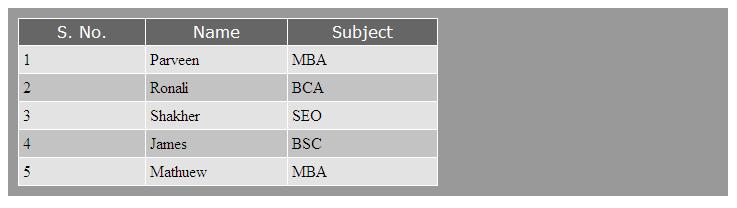
If we talk about the Data Represent into the Website than it is better the best way to display your data into tables, cause IE6 creates lots of problem to in CSS to align the data. And Jquery plays his important roll to beautify that tables Data. The :even, :odd selectors make it beautiful to represent the data. Here is an example :
$('table').css({
	'border-collapse':'collapse'
});

$('tr th').css({'background':'#666666', 'color':'#ffffff', 'font-family':'verdana', 'font-weight':'normal'});

// Here using jquery selectors
$('tr:even').css({'background':'#c3c3c3'});
$('tr:odd').css({'background':'#e3e3e3'});
This code will output similar as like
Jquery Selectors Effects on Table

Friday, September 2, 2011

Get URL, URL part, URL parameters using javascript

Getting URL or URL parts through javascript is so easy. We can get protocal using this code :
	var proto    = window.location.protocol;
	alert( proto );

this code return "http:" protocol.
If you want to get host name from the URL using javascript then you can simple write this code:
	var hostName = window.location.host;
	alert( hostName );


this code return the host name like if you are running this code in local host then it returns "localhost"
if you want to get path of the URL with javascript then use this:
	var pathName = window.location.pathname;
	alert( pathName );


this code returns the path name of the current running script like you are running the script in test.html the it return the full path name with filename test.html
Or if you want to get parameter used in URL with javascript then simply do this:
	var params   = window.location.search;
	alert( params );


it returns the parameter used in the URL

now lets join all the code :
	var proto    = window.location.protocol;
	var hostName = window.location.host;
	var pathName = window.location.pathname;
	var params   = window.location.search;

	alert( proto + hostName + pathName + params );

Related Posts Plugin for WordPress, Blogger...